HELP TO SEARCH THROUGH THE GENERAL CATALOGUE
- Basic points to be considered
AHEB-BEHA’s general catalogue can be consulted on-line. Through it, you will find information about the fonds kept and guarded by AHEB-BEHA.- The information you can find will depend on the type of fonds you are searching. Parochial fonds have been more exhaustively described, so you will find more detailed information. Because these fonds are open, some documentation is still in the parishes; in this case, we will inform you which of the documents have not been transferred. As fonds arrive to AHEB-BEHA, information will be extended.
- The rest of non parochial fonds inside the Diocesan Archival System are being collected and placed at AHEB-BEHA. In this moment, they are inside an archival processing but in brief we will give you more detailed information about them.
- Although you can find several twentieth century documents through our finding aids, you must take into account that neither parishes, nor diocesan bodies or AHEB-BEHA allow the enquiry of documents before 75 years (in accordance with Ecclesiastic Archives Regulations); nevertheless, the enquiry of certain documents can be authorised after studying the accessibility.
- Search
You can search through the general catalogue by:
· Browser facilitates the location of fonds. You can be granted access to the complete register and administrative details of any fonds through the icons inside the brows.

 Fonds are arranged in alphabetic order of places, arranged by the initial letter. As you click on each of them, you will find that some of the form fields appear automatically. From here on, you can click SEARCH and obtain the results.
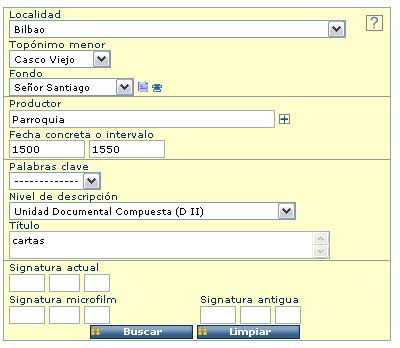
· The form also offers the possibility of getting an assisted help to search through the main fields. You can choose a place, fonds or a keyword / classification (only available in Spanish) from the pull-down lists. Fields as date, creator or title are free text. You can also introduce a signature, if known.
Enquiry fields
Locality or minor entity: They refer, respectively, to bigger or smaller places. Both locality and minor entity’s names (that is neighbourhood, local entity, and so) are names standardized by the Basque Government, although parish distribution is based on an ecclesiastical distribution, non geopolitical.
Fonds: Entity which generates and / or stores the documentation.
Creator: This field identifies document’s most immediate creator. It can be the entity itself, an entity’s department, an associate or related entity, an administrative-related outside entity, or a particular person, as well. Administrative, historical or other relationships explain the existence of these types of fonds-related creators.
Concrete dates or interval: Document’s date; it can be an interval of years, a concrete date (yyyy-mm-dd) or an interval of concrete dates.
Keyword: This pull-down list includes controlled vocabulary terms, alphabetically ordered, taken from AHEB-BEHA’s classification scheme for a concrete type of fonds. These keywords appear only in Spanish because they are directly extracted from records titles.
Title: A summary of the document’s subject, including typology, person names, toponyms, dates, among other significant data.
Signature: It refers to the location of the document or its copies inside the stack.

Guidance to search trough the form
>> Introduce one term by field. Usually, if you enter many terms in one field or several, you will obtain fewer results.
>> The system recognizes both capital and small letters and written accents.
>> Do not use punctuation marks to separate terms.
>> It is convenient to include years in the following format yyyy (complete year), in an interval of no more than 20 years (e.g. 1800-1820) to avoid the accumulation of results; besides, concrete or interval of dates must be introduced in the format yyyy-mm-dd (1820-06-14).
- Enquiry results
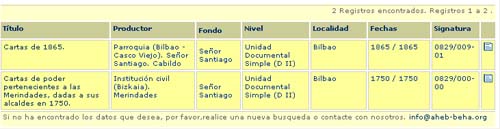
>>Results will be shown in the lowest part of the screen, inside a table. To access the complete ISAD (G) register of any entry, just click the
icon from the browser or click the hypertext on the document’s title.
>>Results will appear in successive pages. To view them, click next or back.
>>In the case of sacramental series already indexed, you will be able to access to the individual registers.
>>If you can not find what you desire, try a new search or contact us in the following e-mail address: katalog@aheb-beha.org