HELP FOR SEARCHING
SACRAMENTAL REGISTERS
- Basic points to be considered
Sacramental registers are literal data extracted from the sacramental certificates of baptism, marriage and death, contained in the sacramental books of 210 parishes from Bizkaia whose fonds are stored in AHEB-BEHA. The process of extracting these data has concluded its first stage, and two other stages are planned (2004-2005 and 2006-2008). As we extend the database, the possibilities of finding the data you may require will be increased..
- Search
Enquiry form consists of two main parts: “Person Details” and “Sacramental Register Details”.
In the part of “Person Details”, you can introduce those details as name, surname and sex of the person who receives the sacrament, as well as the name and surname of his / her father and mother. .
As regards “Sacramental Register Details”, there are several fields referred to the parish where the sacrament was registered and its geographical location, dates, the type of sacrament required, and signatures or physic locations of the document and/or copy inside AHEB-BEHA.
To start the search, you must compulsory combine one data from “Person Details” with another from “Sacramental Register Details”. This circumstance will allow a previous filter.
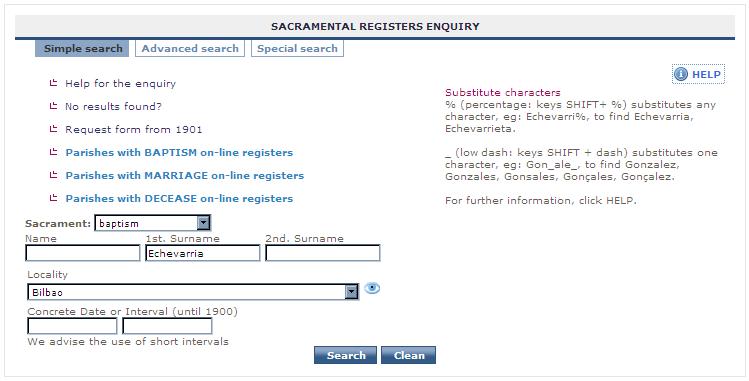
Example 1:
You only know some data. For instance, the first name of the person, and that he could be born around 1850, but you do not know the exact place or parish.
The form will be filled thus:
Example 2:
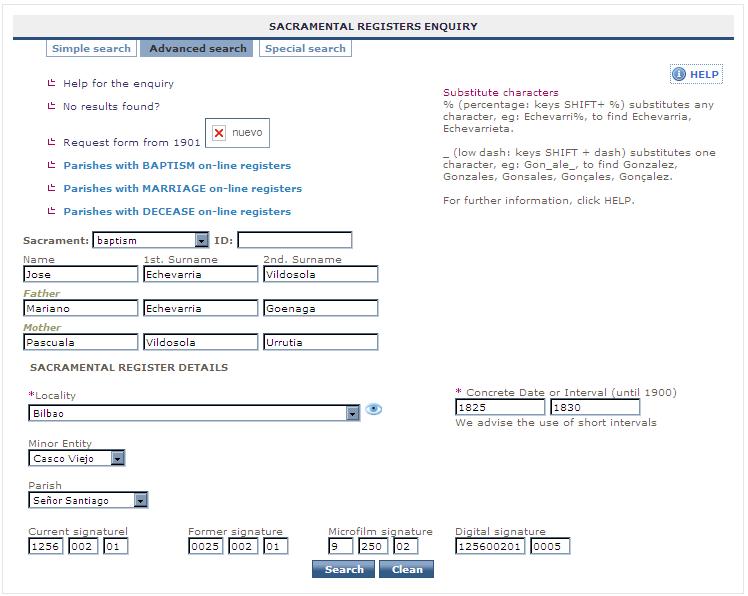
You know exactly all data from both parts, “Person Details” and “Sacramental Register Details”.
The form will be filled thus:
Once you have filled in all the searching terms with the combinations you consider necessary, click SEARCH and you will obtain the results that match with the introduced data; these results will appear inside a table as a summary.
(See search results)
- Enquiry fields
Sex: Choose male or female. Even though this detail can not always be established by the documentation because it might not exist or might be illegible, it is important that you select this field to facilitate the search.
Name, first surname, second surname: Person’s name and surnames. You must insert them literally; nevertheless, the system offers the possibility to replace those characters in which you have doubts.
Father and mother: Name and surnames of father and mother respectively. The criteria are the same as in the former field.
Locality and minor entity: They refer to the geographic parish demarcation where the certificate is registered. Both locality and minor entity’s names (this is neighbourhood, local entity, and so) are names standardized by the Basque Government, although parish distribution is based on an ecclesiastical distribution, non geopolitical
Parish: It refers strictly to the parish’ dedication, without geographical location, so it is convenient to choose previously a locality, at least.
Concrete dates or interval: Sacramental certificate dates; either a year or interval of years; either a concrete date (yyyy-mm-dd) or an interval of them.
Sacrament: To choose among Baptism, Marriage, or Death.
Signature: It refers to the location of the document and / or its copies inside the stack. - Help for the enquiry
Substitute characters
- % (percentage: keys SHIFT+ %) substitutes any character.
- Ø (Blank Space: one keystroke with the space bar) substitutes any character.
- _ (low dash: keys SHIFT + dash) substitutes one character.

Example of search
Name: Juan o Joan
1st Surname: Gonzalez o Gonçalez o Gonçales o Gonsalez o Gonsales
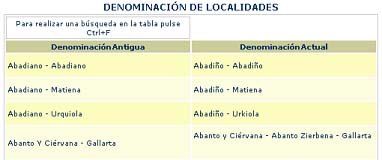
Table of former designation of localities and minor entities
The form includes, as well, a table where changes provided by Basque Government as to the designation of localities and minor entities are listed. This can be helpful to identify localities which have suffered significant changes as to their spelling (e.g. Abadiano-Urquiola, now Abadiño-Urkiola) as to their specific name (Villaro, now Areatza).
Locality, Minor Entity and Parish filters
In these fields, we are offered a list of values to choose the required locality; inside each of them, we can select a smaller entity, and, finally, the corresponding parish. If preferred, you can directly access to any of them without using any filter.
Guidance to search trough the enquiry form
To do any search, you must considerate:
- Person details
>>The extraction of data is literal. If any data appears in square brackets [gonzalez] it means that such word has been inferred, but it doesn’t affect the search. Most of the certificates are written with Spanish spelling of the time and subject to the vices or mistakes of the one who writes. Therefore, it is advisable to search using simple terms or a part of them introducing the substitute characters when necessary.
(E.g.: To search the surname Beitia, we could replace B by low dash _, so we would write _eitia)
>>In the search, try using the substitute charactersto replace those letters which can cause any problem such as b, v, i, y, j, x, s, z, c, h. We must always take into account that spelling has evolved through the centuries, which means that the same name or surname can be written in many ways, even into the same genealogic line, family, and so.
(E.g.: Echevarria, Echebarria, Echebarrya, Hechebarria, Echeverria, Echabarria, etc.)
(E.g.: Gonzalez o Gonçalez o Gonçales o Gonsalez o Gonsales)
>>Generally, results will not be obtained if data are introduced with the actual criteria.
>>Avoid as well the use of prepositions and/or articles while searching.
>>There are many combinations, since patronymics generally appeared next to the name and not as surnames, and vice verse.

>>Rules about written accentsbegan at 1741 (Publication of “Ortographia”, first reference book by the Royal Language Academy), but we must keep in mind that these criteria have varied for the placing of written accents throughout the different grammar rules edited since middle eighteenth century.
>>Choosing sex is an important filter, especially if we know it for sure, or even if we want to discard using this concept. Anyway, documentation does not always allow recording this aspect, because it might not exist or it might be illegible.
- Sacramental register details
>> For Locality, Minor Entity and Parish, a complete list is offered to choose the desired data.
- Enquiry’s results
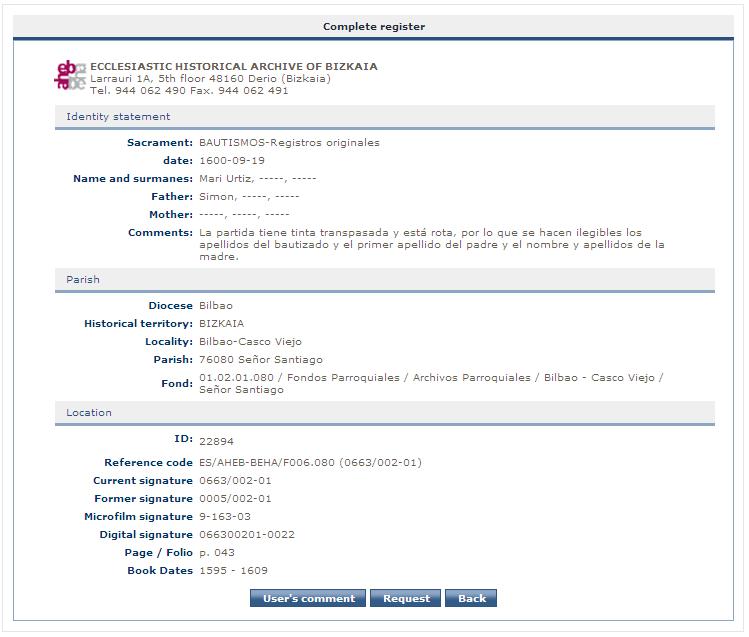
Enquiry’s results are shown as a summary table containing the essential data referred to the person. If you want more information, you can click the icon, and if you want to access to the digitized image, click the
  icon.
This last option will be only available from AHEB-BEHA.
icon.
This last option will be only available from AHEB-BEHA.

Dashes (-) indicate that data are not found in the documentation.
>>If search result is satisfactory, apart from checking the data, you will be able to request them to AHEB-BEHA following the relevant steps.
>> If you do not find any result it can be due to:
- Data have not been introduced precisely. Try a new search taking into account the guidance above, using substitute characters or reducing interval of dates.
- Date is not available in the data base at the moment, so no matter your date is precise, results might not be accurate. In this case, click “No results found” and follow the instructions to file the relevant application to AHEB-BEHA.
- The person you are searching has not received any sacrament in diocese of Bilbao so you must look into the archives of the relevant diocese. You can check: http://www.conferenciaepiscopal.es/diocesis/
- If after trying every possibility you do not find the desired data, please contact us in the email address: info@aheb-beha.org